GTA 6 Family Savings Explained: All Goals and Perks
What Family Savings does in GTA 6: why money there cannot be withdrawn, the savings goals, Checking limits and discounts, interest, carrying money into Chapter 2 and what is known about the ending.

Heads up: This guide mentions minor details from later chapters.
In GTA 6, Family Savings is Jason and Lucia’s shared savings account in the BuckMe app. Money you put here cannot be withdrawn or spent, but it is also not lost when you die, get arrested or when Chapter 1 ends. In return it gives you two things: as you reach certain goals, the limit of your spending account (Checking) goes up and some discounts unlock. So Family Savings is not a piggy bank but a permanent investment: only put in money you are done spending.
GTA 6 Family Savings in short: what it does and does not do
BuckMe is the Fleeca bank’s phone app. It has two accounts: Checking for everyday spending and Family Savings for locked savings. The differences:
| Checking | Family Savings | |
|---|---|---|
| Withdrawals | Withdraw at an ATM | Never |
| Spending | Purchases of $1,000 and up are paid from here | Cannot be spent |
| Death / arrest | A small deduction | Not affected |
| End of Chapter 1 | Balance is wiped | Kept |
| What it gives you | Everyday shopping | Limit increases and discounts |
Pocket cash, meanwhile, is capped at $20,000 per character, and all of it is lost when you die or get arrested. The amount taken from Checking is smaller; reportedly a few thousand dollars at worst, usually less. For all three layers, see our GTA 6 money system guide.
How to open Family Savings and deposit money
The account opens in the Buck Me mission in Chapter 1. Lucia calls Jason to the Fleeca branch in Key Lento; the bank manager says Jason’s credit score is not good enough for a regular account and opens BuckMe accounts for the two of them. A step-by-step walkthrough of the mission is in our BuckMe bank account guide.
- Fleeca Bank
When you get home that same night, BuckMe sends you $100 in welcome money and the game prompts you to move it into Family Savings. After that it always works the same way:
- Deposit cash into your Checking account at an ATM. You cannot deposit cash from your phone; the ATM Finder in BuckMe marks the nearest ATM.
- Open your phone (D-pad up) and go to BuckMe.
- On the Family Savings card, select Buck Yourself and enter the amount.
- Confirm the warning saying the money can never be withdrawn. “Bucking Complete” shows the transfer is done.
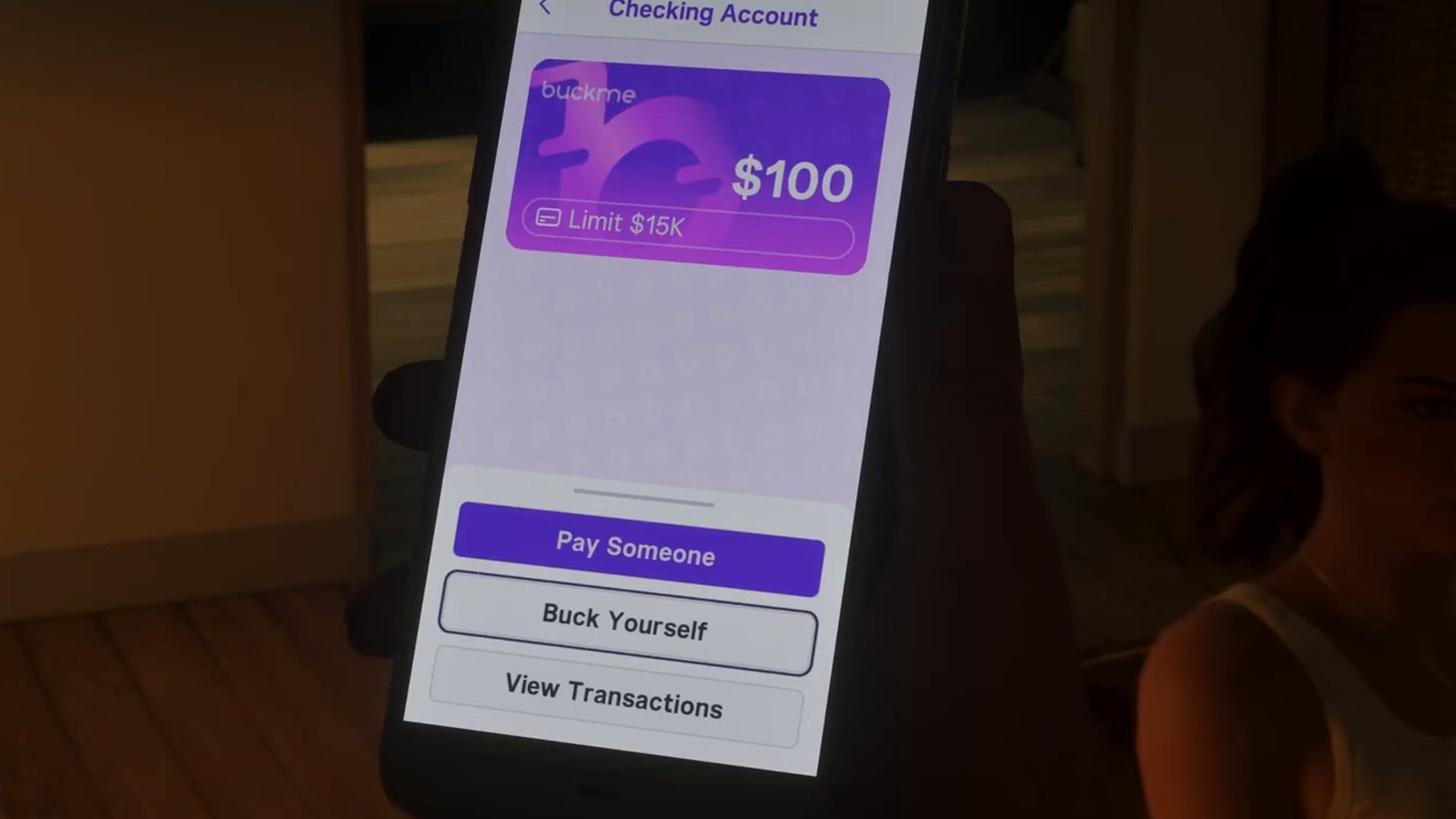
Both Jason and Lucia can put money into this shared account. The details of depositing money at an ATM are in our ATM guide.
The savings goals are tied to a mission chain called Save for the Future. It has no map marker; it sits in your mission list and stays open throughout the story. You do not need to fill the goals to progress the story; they are optional.
GTA 6 Family Savings goals, limits and perks
The table below is the most widely shared list of tiers, but it traces back to a single original list, so most of it is not confirmed yet. Other guides and in-game screens conflict with some rows (row by row under the table). The figures may also change with patches:
| Tier | Savings goal | Checking limit | Perk |
|---|---|---|---|
| Buckin’ Broke | $5,000 | $15,000 | None |
| BuckeDry | $10,000 | $100,000 | 20% off RydeMe rides |
| BuckMe Gold | $100,000 | $500,000 | 20% off garage purchases |
| BuckMe Premium (Black) | $500,000 | $2,000,000 | 10% off liveries |
| Rich as Buck | $1,000,000 | $2,000,000 | None |
| Final Tier | $2,000,000 | $2,000,000 | None (interest claim below) |
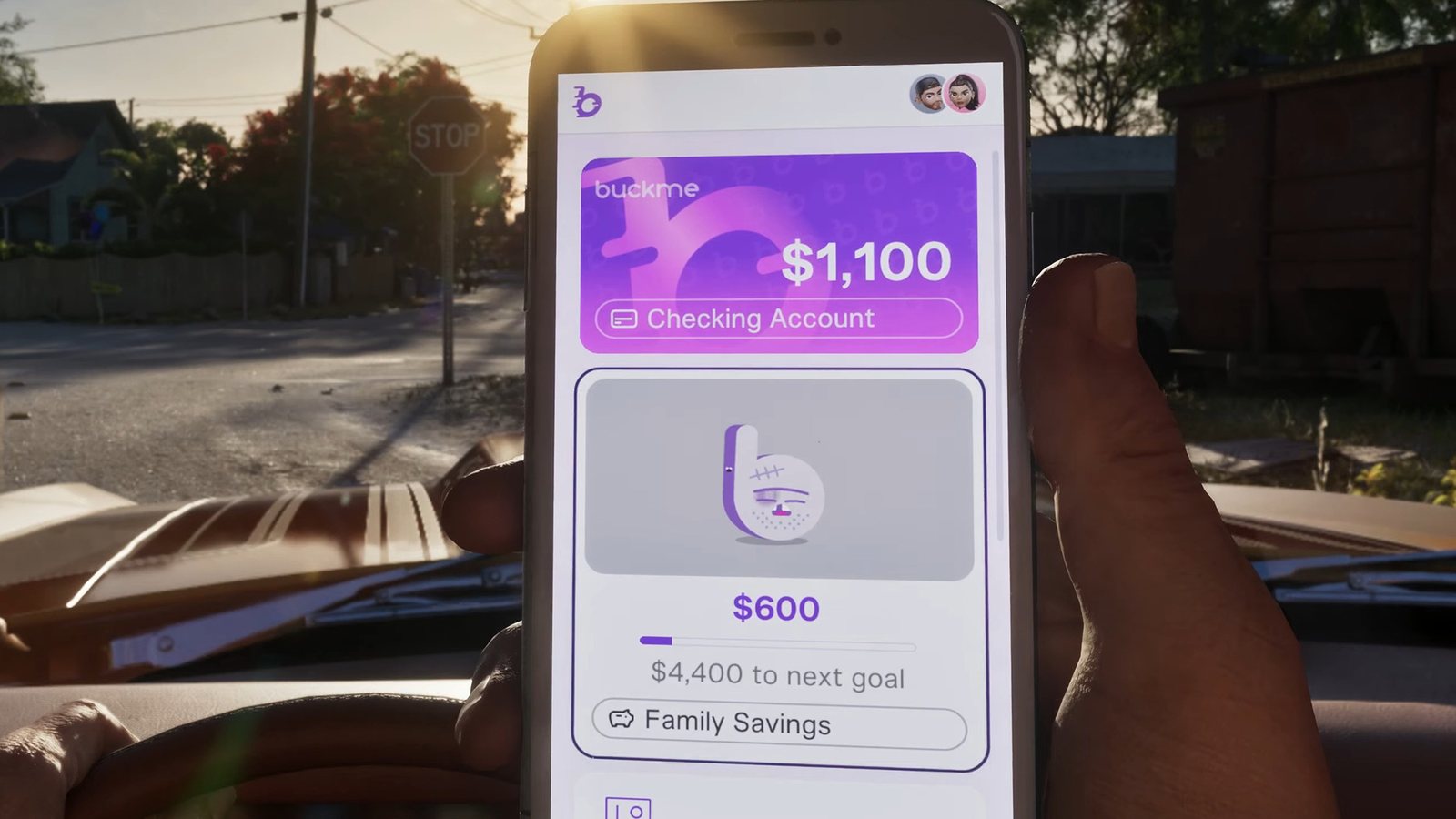
Guides do not agree on the number of goals. Counts range from six tiers to five goals and five tiers to four steps ($5,000, $15,000, $100,000 and $2,000,000). The Family Savings card on the in-game screen also has four goal icons (one checked, three locked). The exact number is unknown; go by the goals the card shows in your own game.
Row by row, the table compares with other guides and the game’s screens like this:
- $5,000 / Buckin’ Broke: Game screens also show that the first goal is $5,000 and the starting limit is $15,000 (at $600 saved the card says “$4,400 to next goal”, and the Checking card says “Limit $15K”). The name conflicts: on an in-game screen the card says “Bucked Dry” once $5,000 is filled, while the table gives this name (BuckeDry) to $10,000.
- $10,000 / BuckeDry: The most disputed row. Other walkthroughs say the account moves to BuckMe Silver in the Chapter 2 mission Coffee Break: a $100,000 limit, 20% cheaper RydeMe and a new $100,000 savings goal; they do not mention a $10,000 step. The in-game Silver message also gives the new limit and the new goal as $100,000. In the four-step list, meanwhile, the second step is $15,000. So the $100,000 limit and the RydeMe discount are consistent, but whether the savings that unlock them are $5,000, $10,000 or $15,000 is unclear.
- $100,000 / BuckMe Gold: The in-game Silver message also shows the $100,000 goal. The $500,000 limit and the garage discount appear only in the table above and are not confirmed yet.
- $500,000 / BuckMe Premium: Reportedly, at the start of Chapter 4 the account moves up to Premium no matter what your savings are; the message on your phone calls it BuckMe Black, the app calls it Premium. Other walkthroughs list this as the reward of a Chapter 4 mission: BuckMe Black, a $2,000,000 limit. The four-step list has no $500,000 step.
- $1,000,000 / Rich as Buck: Appears only in the table above, with no new limit or discount; the four-step list does not have this step.
- $2,000,000 / Final Tier: The goal itself also appears in the four-step list. Most guides list its limit and perk as unknown; the table above gives a $2,000,000 limit with no perk.
The guides that give limits agree on two points: the highest known Checking limit is $2,000,000, and goals unlock with the story. Once you reach a goal, the next one comes after you progress a bit further in the story. Family Savings has a deposit cap that rises as the chapters progress; these upgrades reportedly arrive in Chapters 2, 3 and 4, and once the cap is full you cannot deposit until the next upgrade.
Do not forget why the limit matters: when Checking is full, incoming payments are held until you spend or move money to Family Savings. How the limit rises over the story is covered in our BuckMe limit guide.
Can you withdraw money from Family Savings?
No. The transfer screen clearly says the money can never be withdrawn, and Lucia gives the same warning when she introduces the account. The money cannot be spent or moved to another account. In return, it is never lost in any way: death, arrest and the reset at the end of Chapter 1 do not touch it.
Reportedly the money does not come back even after the story ends, though this is not confirmed yet. So do not put money in thinking “I will take it out later”; money that goes here counts as gone from your spendable balance for the rest of the game.
Does Family Savings pay interest? (Coffee Break and the $200,000 claim)
Yes, but the amounts are not confirmed yet. The Save for the Future mission description says you will get higher interest as you reach goals. If you fill a goal before the limit increase, BuckMe reportedly makes a big interest payment that helps toward the next goal; so interest brings you closer to the next goal.
Unconfirmed figures: If you filled the first $5,000 goal in Chapter 1, $2,000 in interest reportedly arrives in the Coffee Break mission in Chapter 2; this figure is not confirmed yet. There is also a claim that $200,000 in interest comes back at the final $2,000,000 tier, while other reports say the money never comes back, and most guides list the final tier as unknown. Do not treat the $200,000 as certain.
How to save money before Chapter 2: when and how much to deposit
Your money is affected at the end of Chapter 1: pocket cash, the stash in Jason’s bedroom, the Checking balance and Jason’s Ganado do not carry over to Chapter 2. Two things do: the guns you bought and Family Savings. Details are in our Chapter 1 money guide.
So the timing goes like this:
- In Chapter 1: Do not grind money for hours; play the story. Put what you have saved into Family Savings, buy your guns and spend the rest. Do this before the chapter’s last missions; guides recommend having at least $5,000 in Family Savings before starting Tourist Trap (some also mention Recalibration), because the money you carry into these missions is lost.
- Over $5,000: Reportedly you can put at most $5,000 into Family Savings in Chapter 1; this is not confirmed yet, but on the in-game screen the card also says “Available goal reached!” at $5,000. Spend the rest on guns or purchases you will use.
- After Chapter 2: The full reset only happens at the end of Chapter 1. Only put money into Family Savings for limits or discounts. The moments when Checking fills up and payments start being held are the best time to transfer.
Family Savings discounts vs GTA+
Family Savings discounts only work once you reach the relevant tier. The discounts that a GTA+ membership (a paid subscription on PS5 and Xbox Series X|S) gives in GTA 6 apply for as long as the membership lasts:
| Discount | Where it comes from | How much |
|---|---|---|
| RydeMe rides | The tier with the $100,000 limit (BuckeDry / Silver) | 20% |
| Garage purchases | BuckMe Gold tier | 20% |
| Vehicle liveries | BuckMe Premium tier | 10% |
| Selected stores (guns, clothing, barber, tattoo, mods) | GTA+ | 10% |
| Selling a vehicle you own | GTA+ | 10% more money |
| RydeMe premium membership, free scooter and bike rentals | GTA+ | Free |
It is not clear yet whether these discounts stack.
Tip: If you are thinking of buying a garage, wait for BuckMe Gold. Example: the Atlantic Court Garage, reportedly listed at $40,000, comes to $32,000 with a 20% discount; $8,000 saved (our calculation). Garages are bought from the Vice City Real Estate app from Chapter 2 onward.
Does Family Savings affect the ending?
Spoiler warning: This section does not describe how any ending plays out; it only sums up what has been written about the link between savings and the endings.
Guides split in two here:
- Those that say it does: Some write that the state of the account affects some character conversations and the ending you see, and that savings directly affect which ending you get. Others say that having exactly $2,000,000 in Family Savings adds extra scenes to some endings and is one of the conditions for the best ending.
- Those that say it is unconfirmed: Others write that no savings check was seen in the endings and that “save $2,000,000 for the good ending” lists are guesswork.
The tier list above only says the $1,000,000 and $2,000,000 goals are optional and not needed to progress the story; it does not mention any effect on the ending. What is certain: filling the $2,000,000 is not required to finish the story. Whichever reading turns out to be right, make a manual save before starting the finale; the last mission reportedly cannot be replayed.
Frequently asked questions
Can you withdraw money from Family Savings in GTA 6?
No. The transfer screen says the money cannot be withdrawn; it cannot be spent, but death, arrest or the end of Chapter 1 do not wipe it either.
What does Family Savings do in GTA 6?
It protects your money permanently, raises your Checking limit as you reach goals, and unlocks RydeMe, garage and livery discounts. It is also the only money that carries over to Chapter 2 when Chapter 1 ends.
How do you save money before Chapter 2 in GTA 6?
Before the chapter’s last missions, deposit your cash into Checking at an ATM, move it into Family Savings with Buck Yourself, and buy your guns. Pocket cash, the stash and the Checking balance do not carry over to Chapter 2.
How do you get BuckMe Gold in GTA 6?
It reportedly unlocks when you save $100,000 in Family Savings, raises your Checking limit to $500,000 and gives 20% off garages. The in-game message also shows the $100,000 goal, while the limit and discount are not confirmed yet. Since the goal unlocks as you progress the story, it does not show up in early chapters.
Does Family Savings pay interest?
Yes, interest is added if you fill a goal before the limit increase. The amounts are not confirmed yet: about $2,000 in Chapter 2 is reported, while the $200,000 claim at the final tier could not be confirmed.



0 Comments
No comments yet.