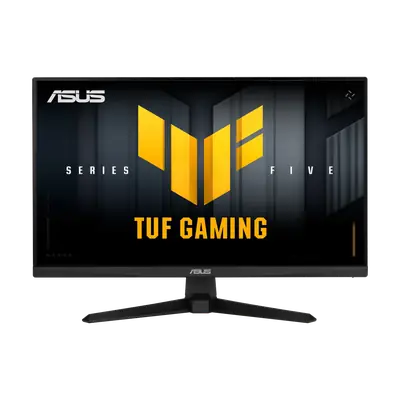
Monitor·ASUS·Released 2025
ASUS TUF Gaming VG259QM5A
24.5" · 1920 × 1080 (FHD) · 240 Hz · IPS
Screen size: 24.5"Resolution: 1920 × 1080 (FHD)Refresh rate: 240 HzPanel type: IPS
Technical specs
Panel
Screen size24.5"
Resolution1920 × 1080 (FHD)
Pixel density90 ppi
Pixel pitch0.28 mm
Panel typeIPS
Panel technologyFast IPS
Refresh rate240 Hz
Response time (GtG)1 ms
Response time (MPRT)—
Curvature—
Aspect ratio16:9
Screen surfaceAnti-glare (matte)
Viewing angle (H/V)178° / 178°
Brightness (typ.)300 nits
Peak brightness (HDR)—
Contrast1000:1
HDRHDR10
DCI-P3—
sRGB99%
Adobe RGB—
Rec. 2020—
Colour accuracy (ΔE)—
Colour depth—
Colours16.7 million
Sync and gaming
Adaptive syncG-SYNC Compatible, FreeSync Premium, VESA AdaptiveSync
VRR range48–240 Hz
Dual mode—
Motion blur reductionELMB Sync
Console features—
Gaming featuresGamePlus, Shadow Boost, GameFast Input, ELMB
Eye care and certifications
Flicker-freeYes
Low blue lightYes
CertificationsG-SYNC Compatible, AMD FreeSync Premium, VESA AdaptiveSync Display 240Hz, TÜV Low Blue Light, TÜV Flicker-free
Ports
Inputs and outputs1x DisplayPort 1.4 (HBR2), 2x HDMI 2.0
HDMI2
HDMI version2.0
DisplayPort1
DisplayPort version1.4
USB-C (power)—
USB-C (DisplayPort Alt Mode)—
USB hub—
DisplayPort out (daisy chain)—
KVM—
PiP / PbP—
Smart TV platform—
Speakers2 W × 2
Headphone outYes
Stand and size
Stand adjustmentTilt
Height adjustment—
Tilt-5° ~ +23°
Swivel—
Pivot—
VESA mount100x100 mm
Power (typ.)—
Power (max.)—
Power (standby)—
Power supply—
Weight3,400 g
Weight (without stand)2,900 g
Width559 mm
Height329 mm
Depth62 mm
Colours—
Warranty—
Burn-in covered by warranty—
Similar products
LG
LG UltraGear 27G850A-B
No price yet27" · 240 Hz

LG
LG UltraGear 27GR83Q-B
No price yet27" · 240 Hz
GIGABYTE
GIGABYTE M27Q X
No price yet27" · 240 Hz
BenQ
BenQ MOBIUZ EX270QM
No price yet27" · 240 Hz

ASUS
ASUS TUF Gaming VG27AQ3A
No price yet27" · 180 Hz

ASUS
ASUS TUF Gaming VG249Q3A
No price yet23.8" · 180 Hz

ASUS
ASUS TUF Gaming VG259Q3A
No price yet24.5" · 180 Hz
ASUS
ASUS TUF Gaming VG27AQ5A
No price yet27" · 210 Hz
Sources
Specs come from the manufacturer's official pages; values the manufacturer does not list are cross-checked in at least two public sources. Product names and images belong to their manufacturers and are shown to identify the product.
Image: ASUS