GTA 6 Weapon Locker and Trunk: How to Store Guns
How weapon storage works in GTA 6: owned, unowned and unique guns, keeping found guns in your trunk, where the weapon lockers are, what you can do at one, and when a gun is lost.
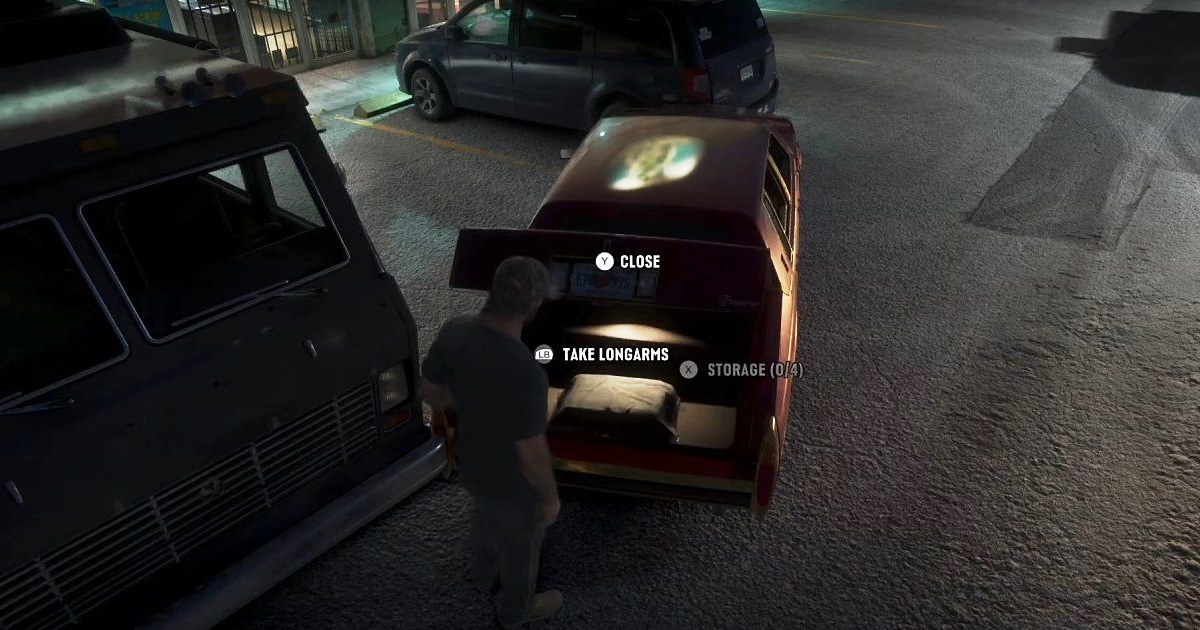
In GTA 6, a gun you pick up off the ground or take from an enemy (white icon) is not permanent. You can keep it by putting it in your personal vehicle’s trunk, but it is lost if you drop it, die (Wasted) or get caught (Busted). Permanent guns come two ways: buying from Ammu-Nation (blue icon) or picking up a unique variant hidden in the world (gold icon). These two are never lost; you get them back from the trunk or a Weapon Locker. Most Ammu-Nation stores have a locker, but not all of them; you can see which by hovering over the store on the map. In the map screenshots seen so far, 18 of the 24 stores show a locker icon, though this count is not confirmed yet. The system as a whole is covered in our GTA 6 weapon system guide.
Icon colors: which guns are permanent?
The color of a gun’s icon on the weapon wheel and the minimap tells you whether that gun is yours.
| Type | Icon | Where it comes from | Permanent? | Modding | Where it is stored |
|---|---|---|---|---|---|
| Owned | Blue | Bought at Ammu-Nation, possibly some mission rewards (not confirmed) | Yes | Yes | Trunk and weapon locker |
| Unowned | White | Found on the ground, taken from enemies or police | No | No | Trunk only, temporary |
| Unique variant | Gold | Specific spots on the map, gang hideouts | Yes | No | Weapon locker and trunk menu |
A gun you buy unlocks for both Jason and Lucia, but ammo, attachments and the carried loadout are kept separately per character. A unique variant also unlocks permanently for both once picked up. The unowned gun icon is sometimes described as gray rather than white. The Ultimate Edition and pre-order bonus gun variants are also picked from the variant list at the locker (Ultimate Edition weapons).
How to store found guns in your trunk
According to the game’s own tip, you can carry at most two pistols and two long guns at once. One long gun goes on your back; most guides say you have to hold the second one in your hands, but the game’s tip does not say where. Another claim is that you carry one gun of each type at a time; this does not match the game’s tip. Pistols are concealed, but long guns are not, and police and civilians can see them. Put the extras in the trunk:
- Go to the back of your personal vehicle and open the trunk with Triangle / Y.
- Hold L1 / LB to open the set you are carrying (loadout).
- Select the weapon slot; press Square / X to stow a long gun (“Stow Longarms”).
- To take it back, select the slot in the same menu and use the on-screen button to switch between the guns in the trunk.
The Xbox buttons are also given differently in places: open the trunk with X, stow the gun with Y. Most guides say Y and X as above, and in-game screenshots also show Y (Close) and X (Storage) prompts at the trunk. If in doubt, follow the on-screen prompt.
There are a few limits:
- The number of unowned guns you can put in the trunk is limited. An in-game screenshot shows a storage counter of 0/4; it is not clear what the counter counts, and this is not confirmed yet.
- You can reportedly put items in the trunk of a stolen vehicle you do not own, but you cannot manage your loadout from it; what is inside goes with the vehicle, and is also lost when you die or get busted. This is not confirmed yet.
- Putting a gun in the trunk does not make it yours. If you take an unowned gun out of the trunk and lose it, it does not come back.
- Guides split here: some say a gun put in a trunk can also be taken from other vehicles’ trunks, others say to look for an unowned gun in whichever vehicle you put it in. Keep an important gun in your personal vehicle.
The clothing and stash bag side of the trunk is covered in our trunk storage guide.
Ammo, body armor and explosives you buy at Ammu-Nation are also reported to go to your personal vehicle’s trunk, though this is not confirmed yet.
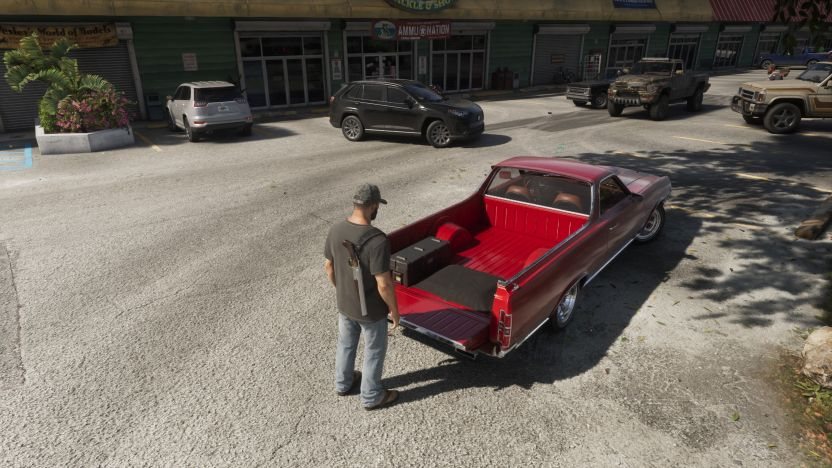
GTA 6 weapon locker locations
The locker is the green, grilled cabinet inside Ammu-Nation stores. On the map, hover over the Ammu-Nation icon and check the “Features” row in the box that opens: if there is a locker-and-pistol icon, the store has a locker (a T-shirt icon means clothing, a fish icon means fishing gear for sale).
Do not read the table below as a definitive list. Locker information has not been written up store by store; the “Locker icon” column was taken from the icons in in-game map screenshots for each store, and it is not confirmed yet. It may change with patches; check the store’s box on the map yourself before a long trip.
| Store | County | Stock | Locker icon |
|---|---|---|---|
| Barrage Gun Supply | Mariana County | Standard | Yes |
| Chuck’s Tackle & Shot | Mariana County | Limited | Yes |
| Guns Aplenty! | Mariana County | Hunting | Yes |
| Richardson Hunting Supplies | Mariana County | Standard | Yes |
| Woodhatch | Mariana County | Expanded | Yes |
| Big Shots | Vice-Dale County | Expanded | Yes |
| Hamlet Traders | Vice-Dale County | Standard | No |
| Phil’s Ammu-Nation | Vice-Dale County | Expanded | Yes |
| Tequesta Guns & Ammo | Vice-Dale County | Standard | Yes |
| Vice City Firearms | Vice-Dale County | Standard | Yes |
| Martez Empeños | Vice-Dale County | Standard | No |
| Jackson Firearms | Vice-Dale County | Standard | Yes |
| Vice City Gun & Pawn | Vice-Dale County | Standard | No |
| Pawn & Gun – Crosstown | Vice-Dale County | Standard | No |
| Quickscope | Vice-Dale County | Standard | Yes |
| Black Eagle | Vice-Dale County | Expanded | Yes |
| Zenon’s Pawn Shop | Vice-Dale County | Standard | No |
| Iron & Oak | Vice-Dale County | Expanded | Yes |
| Prestige Firearms | Vice-Dale County | Expanded | Yes |
| Tactical Outlet Guns | Leonard County | Standard | Yes |
| Pawn & Gun – Port Gellhorn | Kelly County | Standard | No |
| Gellhorn Outfitters | Kelly County | Standard | Yes |
| Biff’s Gun Supply | Kelly County | Standard | Yes |
| Rusty Willis Jr. Hunting Supplies | Lummox County | Hunting | Yes |
Five of the six stores without a locker icon are pawn shops (empeños in Spanish), and pawn shops reportedly may not have the locker menu. All stores and their stock are in our Ammu-Nation guide.
Outside the stores, three garages also have a locker:
- Paradise Garage (Watson Bay): the garage for the ’67 Vapid Dominator Buggy that comes with the Ultimate Edition. Rockstar mentions the locker and a loot drop-off point.
- Shore Court (Ocean Beach): the garage for the ’55 Vapid Stanier from the pre-order Vintage Vice City Pack, also with a locker.
- GTA+ Crosstown garage: unlocks from Chapter 3 with an active GTA+ membership; it reportedly has a locker too, though this is not confirmed yet.
- Phil's Ammu-Nation
- Gun shop, Watson Bay
- Gun shop, Lummox County
- Paradise Garage
What can you do at the weapon locker?
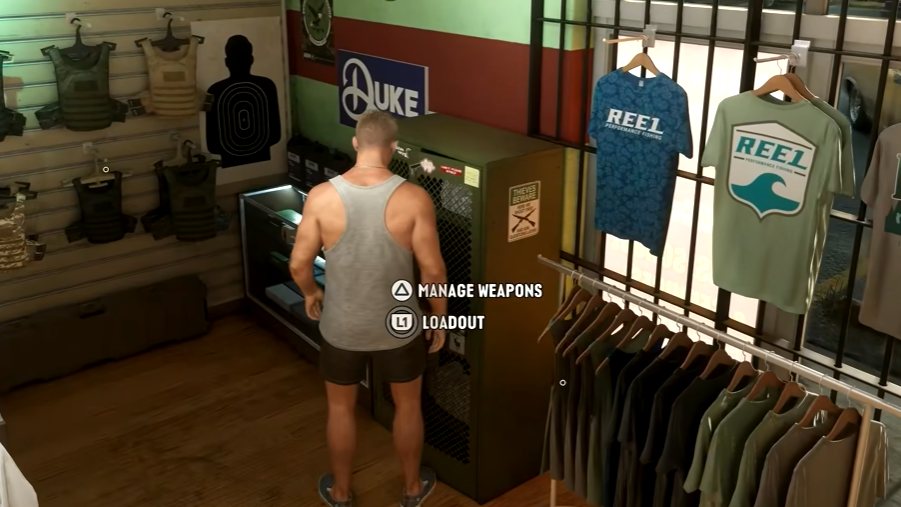
- Triangle / Y (Manage Weapons): lists every gun you own and every unique variant you have found. This is where you switch between your own modded gun and a unique variant.
- L1 / LB (Loadout): the same loadout menu as at the trunk; take and drop guns. Assigning a gun to the trunk is also done here.
- A purchased gun you lost comes back here; you do not need to go from store to store looking for it.
You reportedly cannot use the locker menu while you are holding an unowned gun and need to drop it first; this is not confirmed yet. If a gun you bought does not show up in the trunk, it may help to check the gun’s “In Trunk” status at the locker and take it straight from there (also not confirmed yet).
When are guns lost?
| Situation | Unowned (white) | Purchased (blue) | Unique (gold) |
|---|---|---|---|
| Dropped on the ground | Lost | Taken back from the trunk or locker | Taken back from the locker |
| Wasted | Lost | Taken back | Permanent |
| Busted | Lost | Taken back | Permanent |
| Kept in the trunk | Stays, but the gun does not become yours | Stays | Stays |
If you liked a gun you picked up, buy the same one at Ammu-Nation; there is no other way to make it permanent. Which gun is sold where is in our GTA 6 all weapons list, and the free but permanent ones are in our unique weapons guide. The rules may change with patches.
If a long gun seems to be missing, open the loadout menu with L1 / LB at the trunk or the weapon locker, select the long gun slot and switch between the guns in that slot with L2 / R2 (LT / RT); the gun you are looking for may be in the same slot. This tip is not confirmed yet.
Frequently asked questions
Can you keep guns you find in GTA 6?
Not permanently. You can store an unowned gun with a white icon in your trunk, but it is lost when you drop it, die or get busted. To make it permanent you need to buy the same model at Ammu-Nation. Unique variants with a gold icon, however, are permanent the moment you pick them up.
Where is the gun locker in GTA 6?
At most Ammu-Nation stores and in the Paradise Garage, Shore Court and GTA+ Crosstown garages. In the map screenshots seen so far, 18 of the 24 stores show a locker icon, but this is not confirmed yet. Before you go, hover over the store on the map: if there is a locker icon in the “Features” row, that store has a locker.
Do you lose your guns when you die?
Only unowned (white) guns are lost. You get the guns you bought back from your personal vehicle’s trunk or a weapon locker; unique variants are permanent anyway.
How many weapons fit in the trunk?
There is no written figure yet; space for unowned guns is limited. One in-game screenshot shows a 0/4 storage counter at the trunk, but it does not say what it counts.
Do Jason and Lucia share weapons?
Yes. A purchased gun and a unique variant unlock for both of them. Ammo, attachments and the set carried at the time are separate for each character.
0 Comments
No comments yet.